> ## Documentation Index
> Fetch the complete documentation index at: https://docs.wipe.me/llms.txt
> Use this file to discover all available pages before exploring further.

# Human to human

> Share sensitive information without leaving plaintext in the surrounding conversation.

Use Wipe.me when another person needs a password, recovery code, private note, card
detail, photograph, or file—but the chat, email, ticket, or shared workspace carrying
the handoff should not retain the plaintext.

## Recommended workflow

1. Create the message at [wipe.me](https://wipe.me).
2. Choose an expiration appropriate to the task.
3. Send the private link through the intended conversation. If you selected a
   custom passphrase, share it through a separate trusted channel.
4. Ask the recipient to open it only when ready; retrieval is one-time.
5. Delete an unopened message if the handoff is canceled or sent incorrectly.

The conversation may retain the link, but the original content remains locally
encrypted and is claimed on first successful retrieval.

## Keep an ongoing conversation private

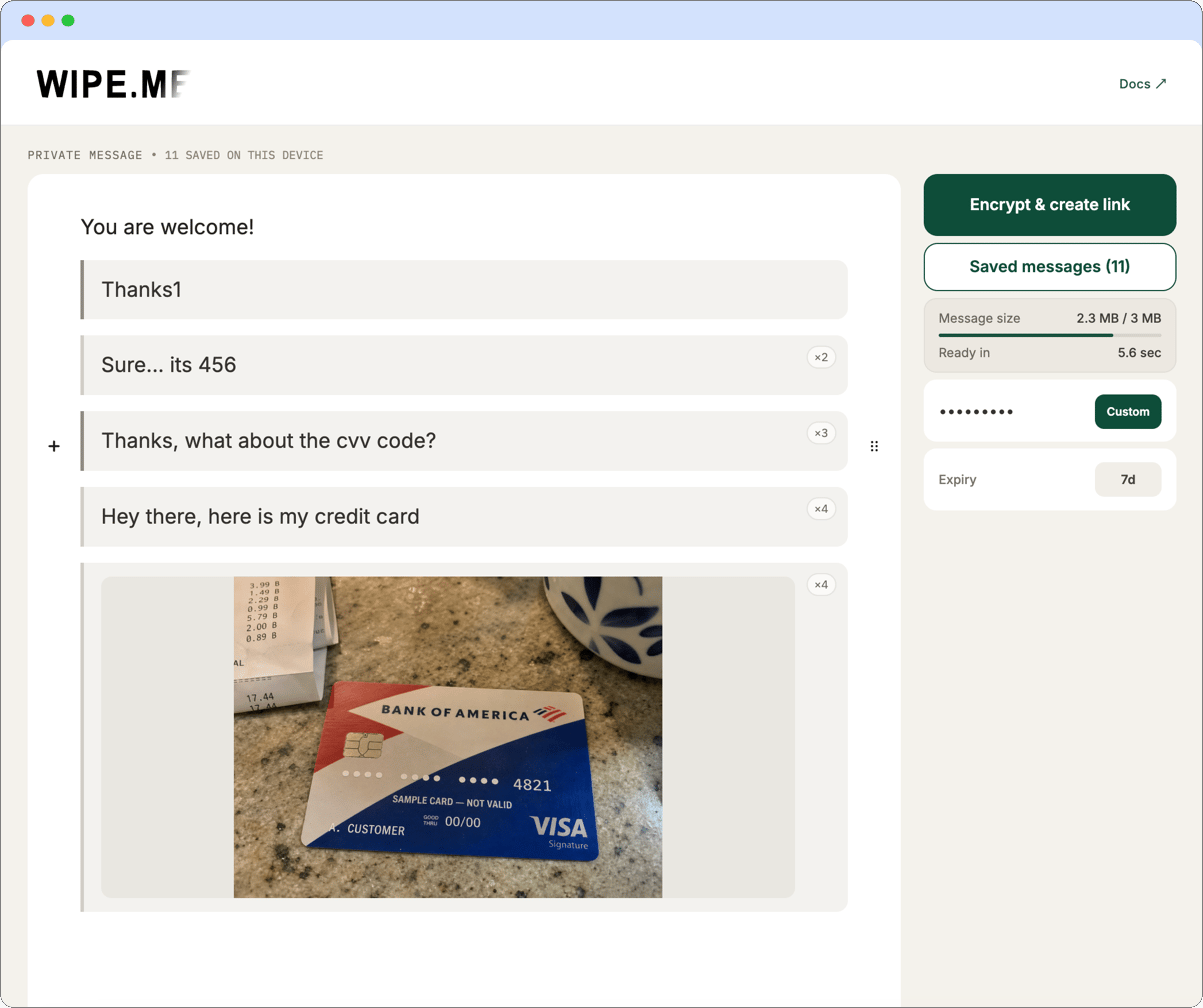
Wipe.me can also protect a continuing conversation, not just an occasional password
or file. You and the other person agree on a shared passphrase once. After that, each
of you can use it to create new one-time messages and send only the resulting Wipe.me
links through your usual messenger.

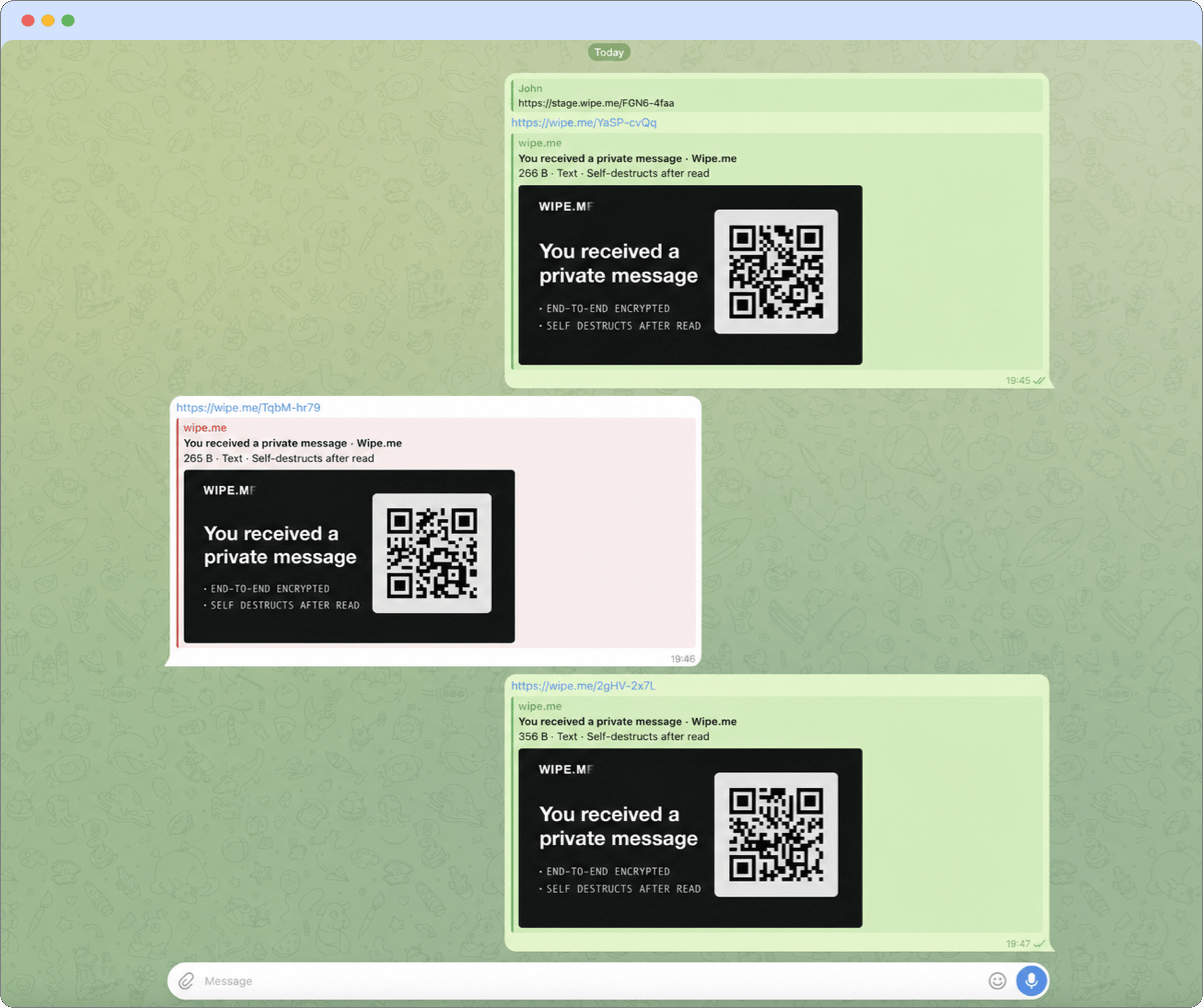
The messenger history contains generic private-message links rather than the subject
and contents of the conversation. The same is true for notification previews,
exports, backups, moderation tools, and other systems that process the messenger
history: they receive the link, not the protected text or attachments.

<div data-carousel-wrapper style={{ position: "relative", width: "100%" }}>
  <div
    role="region"
    aria-label="Private conversation example screenshots"
    data-carousel
    style={{
  display: "flex",
  gap: "12px",
  width: "100%",
  overflowX: "auto",
  scrollSnapType: "x mandatory",
  scrollBehavior: "smooth",
  WebkitOverflowScrolling: "touch"
}}
  >
    <div id="human-human-slide-1" data-carousel-slide style={{ flex: "0 0 100%", scrollSnapAlign: "start", scrollSnapStop: "always" }}>
      <img src="https://mintcdn.com/wipe-me/9FD9UDoZDZeGlJuE/images/screenshots/human-human-screenshot-1.png?fit=max&auto=format&n=9FD9UDoZDZeGlJuE&q=85&s=9080d10c4e2d403063920759e5266d45" alt="A messenger showing generic Wipe.me links instead of the protected conversation" draggable="false" style={{ display: "block", width: "100%", borderRadius: "12px" }} width="1203" height="1008" data-path="images/screenshots/human-human-screenshot-1.png" />
    </div>

    <div id="human-human-slide-2" data-carousel-slide style={{ flex: "0 0 100%", scrollSnapAlign: "start", scrollSnapStop: "always" }}>
      <img src="https://mintcdn.com/wipe-me/9FD9UDoZDZeGlJuE/images/screenshots/human-human-screenshot-2.png?fit=max&auto=format&n=9FD9UDoZDZeGlJuE&q=85&s=86e38c7d8fa98c8ee6378d6c30668380" alt="The private conversation opened locally through Wipe.me" draggable="false" style={{ display: "block", width: "100%", borderRadius: "12px" }} width="1203" height="1008" data-path="images/screenshots/human-human-screenshot-2.png" />
    </div>
  </div>

  <button
    type="button"
    data-carousel-direction="previous"
    aria-label="Show the previous conversation screenshot"
    style={{
  position: "absolute",
  left: "12px",
  top: "50%",
  transform: "translateY(-50%)",
  zIndex: 2,
  display: "grid",
  placeItems: "center",
  width: "40px",
  height: "40px",
  borderRadius: "999px",
  background: "rgba(17, 24, 39, 0.78)",
  border: 0,
  outline: "none",
  color: "white",
  cursor: "pointer",
  fontSize: "28px",
  lineHeight: 1,
  padding: 0
}}
  >
    ‹
  </button>

  <button
    type="button"
    data-carousel-direction="next"
    aria-label="Show the next conversation screenshot"
    style={{
  position: "absolute",
  right: "12px",
  top: "50%",
  transform: "translateY(-50%)",
  zIndex: 2,
  display: "grid",
  placeItems: "center",
  width: "40px",
  height: "40px",
  borderRadius: "999px",
  background: "rgba(17, 24, 39, 0.78)",
  border: 0,
  outline: "none",
  color: "white",
  cursor: "pointer",
  fontSize: "28px",
  lineHeight: 1,
  padding: 0
}}
  >
    ›
  </button>

  <div
    aria-label="Choose a conversation screenshot"
    style={{
  position: "absolute",
  left: "50%",
  bottom: "44px",
  transform: "translateX(-50%)",
  zIndex: 2,
  display: "flex",
  gap: "6px",
  padding: "3px 7px",
  borderRadius: "999px",
  background: "rgba(17, 24, 39, 0.62)"
}}
  >
    <button
      type="button"
      data-carousel-target="human-human-slide-1"
      data-carousel-dot
      aria-label="Show screenshot 1 of 2"
      aria-current="true"
      style={{
    appearance: "none",
    background: "transparent",
    border: 0,
    outline: "none",
    color: "#A89FFF",
    cursor: "pointer",
    fontSize: "13px",
    lineHeight: 1,
    padding: "3px",
    opacity: 1
  }}
    >
      ●
    </button>

    <button
      type="button"
      data-carousel-target="human-human-slide-2"
      data-carousel-dot
      aria-label="Show screenshot 2 of 2"
      style={{
    appearance: "none",
    background: "transparent",
    border: 0,
    outline: "none",
    color: "white",
    cursor: "pointer",
    fontSize: "13px",
    lineHeight: 1,
    padding: "3px",
    opacity: 0.72
  }}
    >
      ○
    </button>
  </div>
</div>

Each message is still retrieved only once. The shared passphrase makes repeated
exchanges convenient because it can be remembered or stored separately instead of
being included in every link.

<Note>
  The messenger can still retain ordinary conversation metadata, such as the
  participants, timestamps, and the fact that Wipe.me links were exchanged. If the
  shared passphrase may have been exposed, agree on a new one before continuing.
</Note>

<Warning>
  Confirm the recipient through a separate trusted signal when impersonation is a
  concern. Wipe.me protects the content in transit and at rest; it does not verify the
  identity of the person opening a bearer link.
</Warning>